3D Anatomy
Education MobileMedical
4.3349.00 Reviews
- Version
- 7.0
- Installs
- 100.00K
- Age Rating
- Everyone
Screenshots
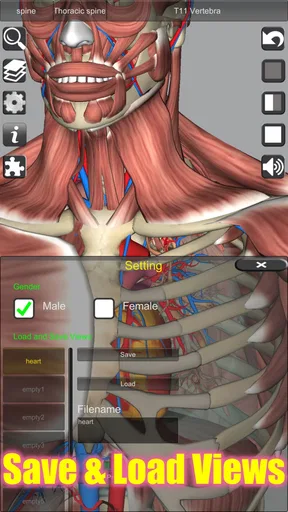
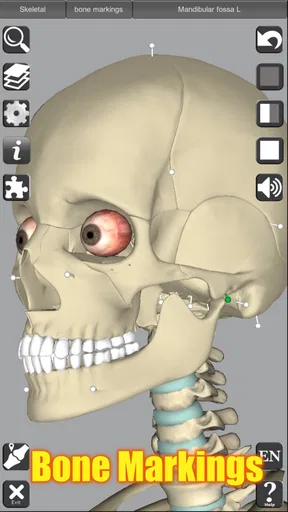
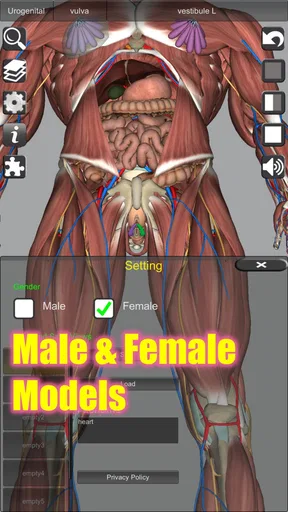
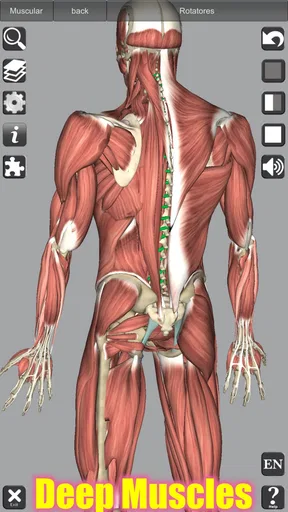
Our Review of 3D Anatomy
 Analysis by Appyee
Learning anatomy becomes much easier when I can rotate a body part, hide surrounding structures, and connect a muscle with the movement it produces. That is the practical idea behind 3D Anatomy, a paid medical app from Education Mobile. It is designed as a visual study tool rather than a general health reference, and its strongest appeal is the ability to examine the human body in three dimensions instead of relying only on flat diagrams.
I found the app most useful when I wanted to understand relationships: which muscle sits beneath another, how a structure is positioned around a joint, and what changes when a muscle contracts. That makes it more engaging than flipping through a conventional anatomy image, although it also means the experience depends heavily on having a device that can display interactive 3D content comfortably. This is not an app I would recommend simply because someone wants quick medical definitions. It is better suited to learners who think spatially and are willing to spend time exploring.
How the 3D approach feels in everyday study
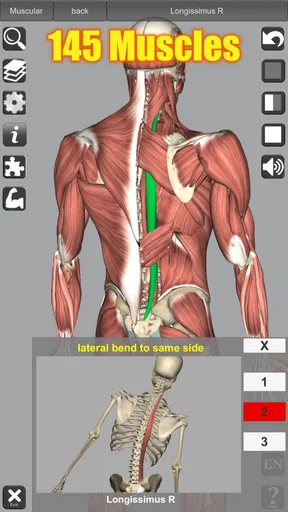
The first thing I noticed is that the app’s value comes from interaction, not from the short label attached to each structure. A static illustration can show where a muscle is, but it often leaves me guessing about depth. With a three-dimensional model, I can mentally separate the layers of the body and understand why a structure is difficult to see from one angle. That is especially helpful around the shoulder, hip, spine, and other areas where muscles overlap.
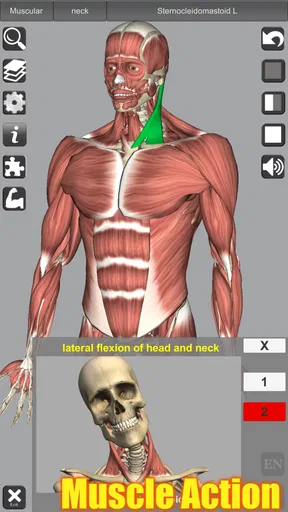
The muscle-action focus gives the app a clearer purpose than a basic rotating skeleton. I can use it to connect an anatomical name with a movement rather than memorizing isolated terms. For example, when revising before a class, I would first identify a muscle, inspect its position, and then think through the action associated with it. That sequence is more useful to me than reading a list and hoping the information sticks.
The best way to use this app is as an active study surface, not as a passive textbook. I get more from it when I make myself predict what I am about to see. Before rotating the model, I try to locate the structure from memory. Before checking the action, I ask what movement should logically follow from its attachment and direction. The model then becomes a way to test my understanding instead of simply displaying answers.
What the visual model does well
Three-dimensional viewing is particularly strong for learners who struggle with orientation. Turning the body slightly can clarify whether a muscle is superficial or deep, medial or lateral, and closer to the front or back of a joint. That kind of spatial correction is difficult to achieve with a single textbook picture, even if the textbook contains more written explanation.
I also like the possibility of using the app in short bursts. A focused session on one region can be more productive than opening a large anatomy book when I only need to settle one question. A student reviewing the shoulder before practical work, for instance, can use the visual model to rebuild the area in the mind rather than rereading an entire chapter.
There is a trade-off, however. A model can make anatomy feel clearer while still leaving important context to the learner. If I need detailed clinical correlations, pathology, imaging interpretation, or a long explanation of terminology, a dedicated textbook or course resource is likely the better companion. The app helps me see and organize structures; it should not replace a complete medical curriculum.
Speed expectations and the role of the device
Because this is a genuinely three-dimensional anatomy application, I would not judge it by the same standard as a simple flashcard tool. Rotating and displaying anatomical layers naturally asks more from a phone or tablet than scrolling through text. On a reasonably modern device that meets the Android requirement, I would expect the basic interaction to feel more comfortable than on older hardware, but the exact experience can vary with the device.
The minimum operating-system requirement is Android 5.1, which gives the app a broad compatibility range. That does not automatically mean every compatible phone will feel equally smooth. Operating-system support tells me whether installation is possible; it does not guarantee that an older handset will handle a complex model with the same ease as a newer tablet.
For the best experience, I would use a larger screen when available. A phone is convenient for a quick review, but a tablet gives the model more room and makes labels and fine anatomical relationships easier to inspect. This matters during longer sessions because repeatedly zooming and repositioning a small display can become tiring. The app is portable, but portability and comfort are not always the same thing.
I would also avoid judging performance during a rushed first launch. Three-dimensional educational content can take a moment to become familiar, and the user interface may feel less immediate than a conventional list. Once I know where I want to look, the workflow becomes more purposeful. The real question is not whether the app behaves like a lightweight note-taking tool, but whether the visual exploration remains usable during normal study.
Where heavier use can expose friction
A short session focused on one muscle is a relatively light demand from a user’s point of view. A longer review in which I move through several body regions, repeatedly change viewpoints, and inspect layers is more demanding. That is when screen size, device age, and general system responsiveness become more noticeable. I would plan serious revision on a device that already feels comfortable with interactive graphics rather than choosing an older phone simply because it can install the app.
Long study sessions also reveal a human limitation: three-dimensional exploration can become distracting. It is easy to keep rotating the model because the movement is interesting, without actually improving recall. I get better results when I set a small goal, such as identifying the muscles involved in one joint action, and stop once I can explain the relationship without looking.
Another useful habit is to alternate between exploration and recall. I might spend a few minutes examining the model, then close the app and sketch the region or describe it aloud. This exposes whether the visual session created real understanding or only recognition. The app is particularly good at helping me build a mental map, but I still need an active recall step to turn that map into exam-ready knowledge.
Stability, recovery, and sensible study habits
I see reliability here in practical terms: being able to return to a study topic, reorient myself, and continue without losing the purpose of the session. A three-dimensional model can be disorienting if I rotate too far or lose track of which surface I am viewing. When that happens, I find it more effective to reset my attention by returning to a familiar landmark, such as a major bone or joint, rather than continuing to spin the model randomly.
That is also why I would organize study around regions instead of jumping constantly between unrelated structures. A session on the lower limb, followed by a short recall exercise, is easier to recover from than an unplanned tour through the entire body. The app supports visual investigation, but the learner has to provide the structure.
If I were preparing for a practical assessment, I would use the app before the assessment to build orientation and then use physical models, class notes, or a more detailed reference to verify terminology. The recovery benefit is simple: if I forget where a structure sits, I can return to the model and rebuild the relationship visually. That is more useful than rereading a definition that never formed a clear spatial image in the first place.
I would still keep expectations realistic about reliability. No interactive anatomy model can remove the need for careful checking, and I would not use a study app as the sole authority for patient care or clinical decisions. Its proper role is educational support. For a student, that is valuable; for professional diagnosis, it is not an appropriate substitute for current clinical resources.
Who will benefit most from it
This app makes the most sense for anatomy students, health-science learners, and curious users who learn better by seeing relationships in space. It can also help someone who has memorized names but still cannot picture where structures are located. The muscle-action emphasis is useful for connecting anatomy with movement, which may appeal to learners interested in exercise, rehabilitation, or movement science, provided they use it alongside more complete educational material.
I would especially recommend it to a student who keeps confusing neighboring muscles. Instead of memorizing another paragraph, the student can inspect the area from several directions and compare the structures directly. That is one of the app’s less obvious strengths: it turns confusion between similar or overlapping structures into a visual comparison problem.
The app is less suitable for someone who wants a fast symptom checker, a medication guide, or a general medical encyclopedia. It is also not the best first choice for a learner who dislikes visual exploration and prefers concise flashcards with spaced repetition. A flashcard app may be more efficient for daily terminology drills, while a textbook may be better for detailed explanations and clinical context. I would choose this app when the main obstacle is spatial understanding.
Cost, compatibility, and what to expect from ownership
3D Anatomy costs $2.99, so it sits in the category of a small paid study purchase rather than a free utility. I appreciate that the decision is straightforward: someone can decide whether interactive anatomy is worth that price without treating the app like a long-term subscription commitment. For a learner who repeatedly struggles with visualizing muscles, the cost can be reasonable because the app addresses a specific problem that ordinary notes do not solve as well.
The app is rated for Everyone, but that age label should not be confused with academic simplicity. The subject is still human anatomy, and younger users may need guidance to understand terminology and use the model productively. The rating describes suitability from an age perspective, not the depth of study required.
The current version is 7.0, and the app has been available since September 1, 2013. That long presence suggests a product with an established place in its niche, while the version number indicates that it has gone through multiple iterations. I would still make the practical decision based on my device and study needs: compatibility is broad down to Android 5.1, but a supported older device may not provide the most comfortable visual experience.
How it compares with familiar alternatives
Compared with a printed anatomy atlas, this app offers more freedom to change viewpoint and investigate depth. The atlas usually wins when I need a carefully composed reference image, extensive annotations, or a broader written explanation. The app wins when the question is, “Where exactly is this structure in relation to the others?” I see them as complementary rather than interchangeable.
Compared with flashcards, the app is slower for pure memorization but stronger for building a mental map. Flashcards are excellent when I already understand the region and want to test recall repeatedly. This tool is better earlier in the process, when I need to make sense of the body’s arrangement before drilling names and actions.
Compared with a video lesson, the model gives me control over the viewing angle instead of following someone else’s pace. A video may explain movement or clinical relevance more naturally, while the app lets me pause and inspect a confusing area. If I had to choose only one resource for a complete course, I would not choose this app alone. If I already have lectures and notes, it can fill the specific gap between hearing an explanation and actually picturing the anatomy.
A realistic workflow for students
Imagine I have a practical class the next morning and keep mixing up the muscles around a joint. I would begin by selecting the relevant body region and identifying the major landmarks. Then I would inspect the muscles one at a time, changing the viewing angle to see what is superficial and what lies underneath. After that, I would connect each muscle with its action and test myself without looking.
The important step is not simply rotating until the anatomy looks familiar. I would write a short list of structures from memory, reopen the model, and check only the points I missed. That turns the app into a targeted correction tool. It also prevents a common problem with visual apps: spending a long time browsing while retaining very little.
For a longer revision plan, I would divide sessions by region and reserve a final session for connections between regions. The app is strongest when I use it to answer a focused spatial question, such as why two muscles appear close together from one side but separate from another. Those are the moments when a three-dimensional model provides something a flat diagram cannot easily reproduce.
My performance verdict
After considering its visual purpose, device demands, and study workflow, I see 3D Anatomy as a focused educational tool with a clear strength: it makes muscle position and action easier to picture. Its performance is best judged by how effectively it supports that task, not by whether it replaces every other anatomy resource. A larger or newer device should make extended exploration more comfortable, while an older compatible phone may be better reserved for brief reviews.
There is some friction in the need to guide the experience yourself. The app will not automatically create a study plan, and visual exploration can become unfocused without a question in mind. It also cannot provide the full depth of a textbook, lecture series, or clinical reference. Those are genuine limitations, but they are acceptable when the user understands the app’s role.
With an average rating of 4.3 from around three thousand ratings and more than one hundred thousand installs, it has clearly attracted a substantial audience of learners. I would not treat those figures as a guarantee that it fits every study style, but they do match my overall impression: this is a specialized anatomy app that delivers the most value when spatial visualization is the problem to solve.
My recommendation is simple. Choose it if you want to rotate and inspect anatomy, connect muscles with movement, and use short visual sessions to strengthen classwork. Skip it if you mainly need flashcard repetition, detailed clinical explanations, or a general-purpose medical reference. For the right learner, the $2.99 purchase is a sensible way to make anatomy less abstract. It works best as the visual layer in a broader study routine, not as the entire routine.
Verdict
Strengths of 3D Anatomy
- Detailed 3D models make complex anatomy easier to visualize.
- Interactive rotation and zoom help users examine structures from every angle.
- Useful reference for students, educators, and healthcare professionals.
- Clear labeling supports independent study and quick revision.
- Works well for learning at your own pace outside the classroom.
Limitations of 3D Anatomy
- Some advanced content may require a paid subscription or in-app purchase.
- The large 3D models can use considerable storage and device resources.
- Older phones or tablets may experience slower loading or reduced performance.
- Medical terminology can feel difficult for beginners without prior knowledge.
- The app may not replace textbooks, lectures, or professional medical guidance.
Similar Picks in This Category
View All
WebMD: Symptom Checker
WebMD, LLC4.1

Microphone Amplifier
DOSA Apps4.2

Anatomy Learning - 3D Anatomy
3D Medical OU4.5

Period Tracker and Calendar
SimpleInnovation4.9

GoodRx: Prescription Coupons
GoodRx4.8

CVS Health
CVS Pharmacy4.5
Frequently Asked Questions
What is 3D Anatomy, and what can I use it for?
3D Anatomy is an interactive educational app that lets you explore detailed three-dimensional models of the human body. You can rotate, zoom, and isolate anatomical structures to study systems such as the skeleton, muscles, organs, nerves, and blood vessels. It is useful for students, teachers, healthcare learners, and anyone who wants a more visual way to understand human anatomy.
Is 3D Anatomy suitable for beginners, or is it designed only for medical students?
The app can be useful for both beginners and advanced learners, although the amount of anatomical information may feel overwhelming at first. Beginners can start by exploring basic body systems and using labels to identify structures, while medical and health-science students may appreciate the deeper level of detail. It works best as a study aid rather than a complete replacement for textbooks or formal instruction.
Does 3D Anatomy work without an internet connection?
Many of the app’s core viewing features may be available offline once the necessary content has been installed, but this can depend on the version, device, and specific models included. Internet access may still be required for the initial download, updates, additional content, advertisements, or certain interactive resources. It is a good idea to open the app once while connected before relying on it for offline study.
Are the anatomical models and information accurate enough for studying?
3D Anatomy provides a helpful visual representation of the human body, making it easier to understand the position and relationship between structures. However, users should remember that simplified models may not show every variation or clinical detail found in real anatomy. Students should compare important information with trusted textbooks, course materials, or guidance from qualified instructors, especially when preparing for examinations or clinical work.
Does 3D Anatomy include in-app purchases, advertisements, or privacy concerns?
The available features, advertisements, and payment options can vary between the Android and iOS versions and may change after updates. Some advanced models or tools may require a premium purchase, while free editions can include advertising. Before downloading, review the store listing, permissions, subscription terms, and privacy policy. Avoid entering sensitive personal or medical information, since the app is intended for education rather than patient documentation.
